x86-64 · AArch64 · Raspberry Pi 4 & 5 · GPL-3.0

A microkernel,
written from scratch.

SIEOS is a small, fast operating system in C. It has its own file system, its own C compiler, a desktop laid out as BeOS's was, its own network stack with TLS 1.3, and an AI assistant that runs a language model on the machine. All the code is new.

Work in progress. This is the new SIEOS, rebuilt as a microkernel. It is not stable yet.

  • 43 KBkernel on x86-64
  • 0.08 sboot to the first prompt
  • 3.1 MiBRAM in use, logged in
  • 0.43 µsmessage round trip

How it works

A small kernel.
Everything else is a program.

The kernel only manages memory, threads on every CPU, time, and messages between programs. It delivers hardware interrupts as messages too. The disk driver, the file system, the console, the network and the desktop are ordinary programs: servers.

  • A crash takes down one server. init starts it again in about a millisecond, and its clients carry on by themselves.
  • Servers start on demand. The network, the assistant and the accounts server start the first time a program asks for them, and stop after a quiet period.
  • Every message carries its sender. The kernel copies it and stamps it with the sender's identity, so the file server knows who is asking.
  • One portable core. The same core runs on x86-64 and AArch64, with SMP, tickless time, memory quotas and W^X.
the layers
programs   sh  fetch  sia  svc  hello  bench ...
               │ messages, stamped with the sender's identity
servers    init  con  vblk  fs  auth  login
           atlas  netd  vnet  siad  gpiod
               │
kernel     memory, threads, scheduler,
           messages, quotas
           + one architecture: x86-64 or AArch64
               │
hardware   CPUs, RAM, disk, screen, keyboard,
           network card, serial port
initthe supervisor: starts and restarts every server
conthe console: serial port, keyboard, mouse
vblkthe disk driver: virtio, or the Pi's SD card
fsthe file server (SieFS); it checks permissions
login auththe login; the accounts server, on demand
atlasthe desktop
vnet netdthe network card's driver; TCP/IP, DHCP, DNS, on demand
siadthe assistant, on demand
gpiodthe Pi's GPIO pins (simulated elsewhere), on demand

The desktop

Laid out as BeOS's was,
in frosted glass.

Windows with title tabs, the Deskbar, four workspaces and the sia strip, in a day or a night palette. It is one process, and it draws nothing when nothing happens.

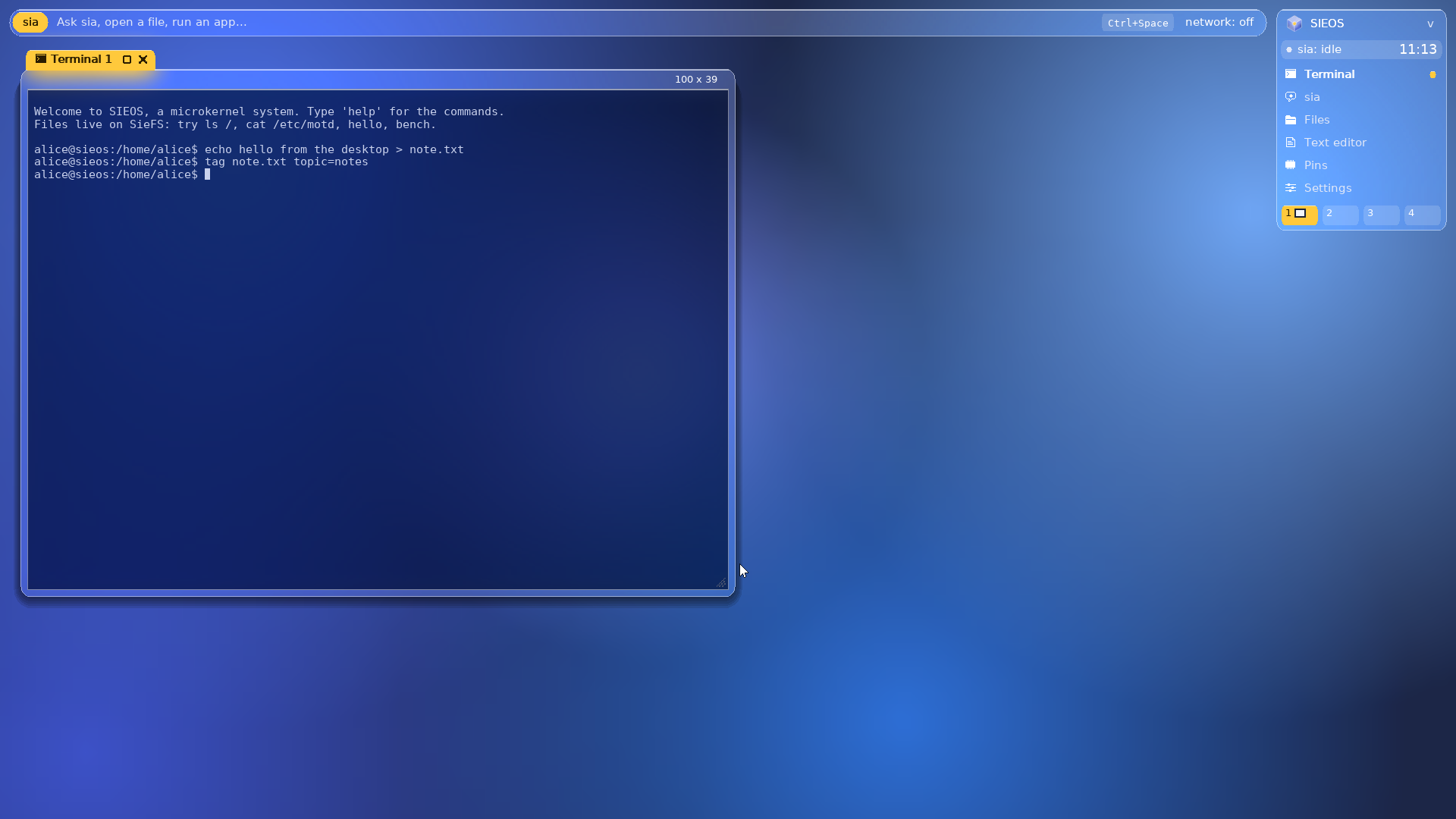
The desktop: a terminal with its amber title tab, the sia strip along the top, the Deskbar with its icons at the top right
1

Windows with tabs

A tab as wide as the title, with the app's icon. Drag it to move, double-click to minimize; zoom, resize by any edge. Only the focused window's tab is amber, and it casts the deepest shadow. A window opened or minimized flies to its row on the Deskbar as a ghost of light.

2

The Deskbar

The menu, sia's state, the clock, and the apps, each with its pixel icon: Terminal, sia, Files, Text editor, Pins, Settings. A lit dot marks a running one.

3

Workspaces

Four of them, each cell a small map of its windows. Ctrl+1 to 4 switch; Send to workspace moves a window.

4

The sia strip

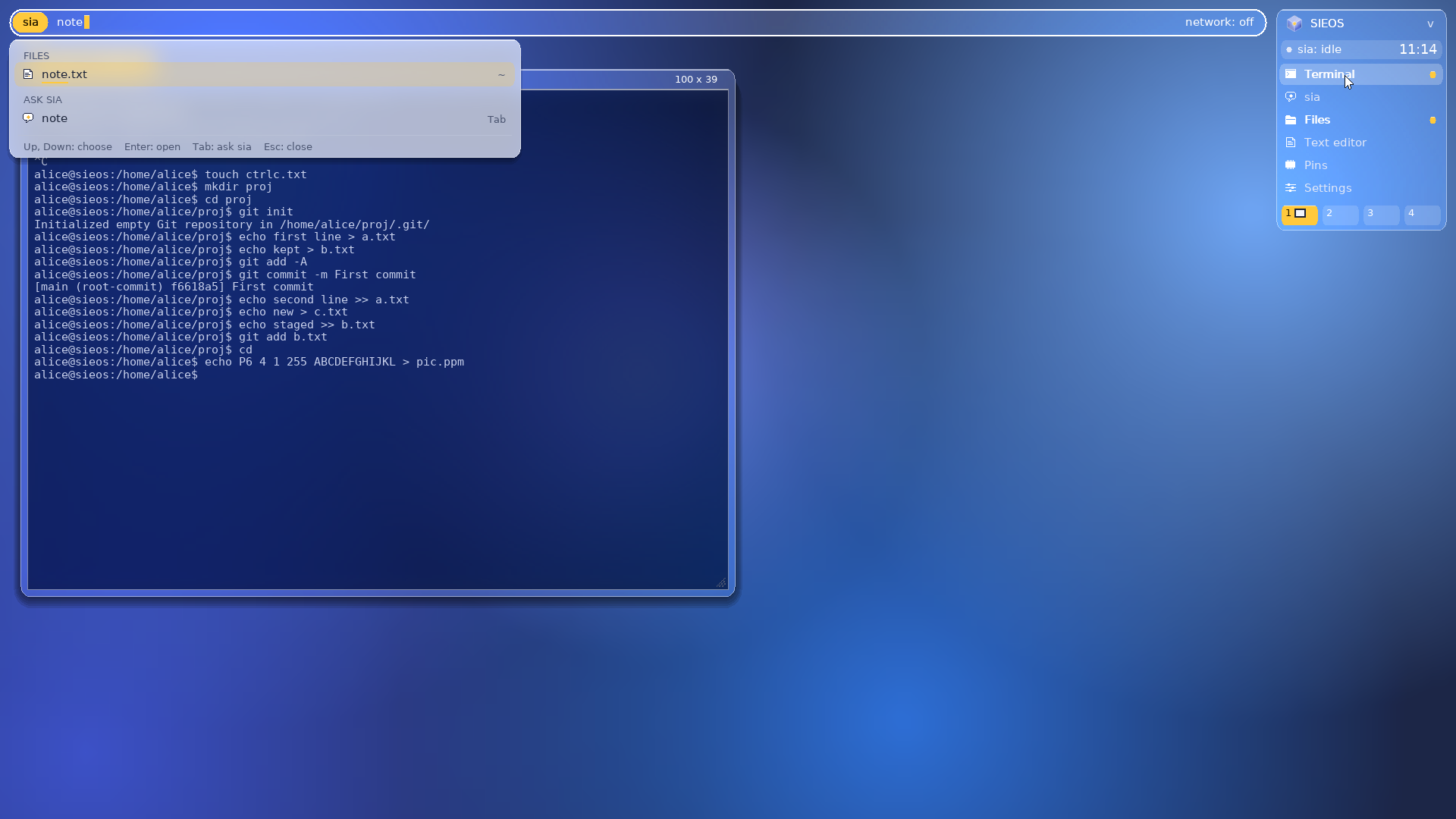
Ctrl+Space opens a command palette: the apps at once, then the files that match what you type, or a question for sia.

The sia strip as a palette: note.txt lit in amber under Files, a question for sia under it, the keys on the last line
The sia strip. Up and Down choose, Enter opens, Tab asks sia.
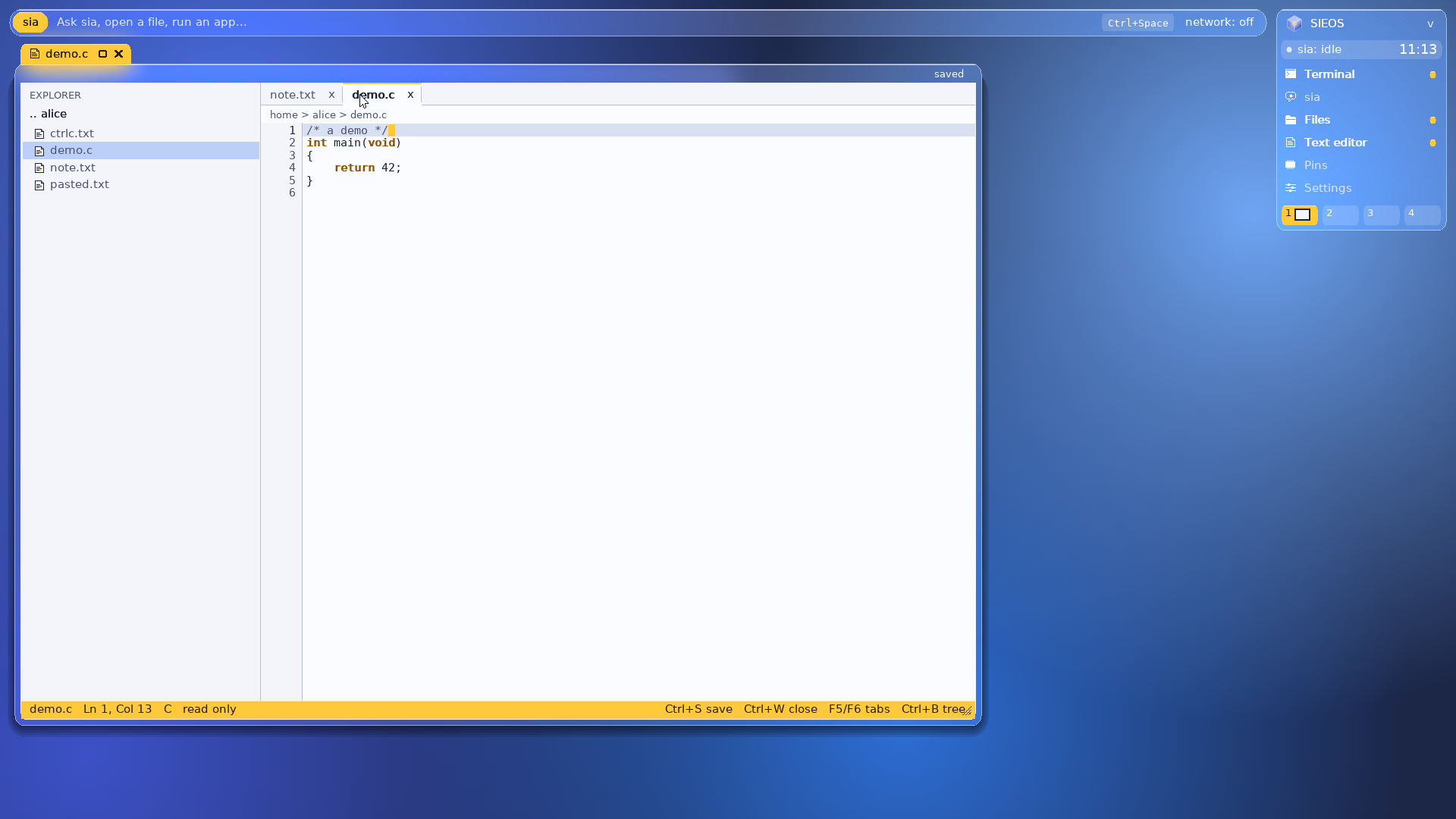
The editor: an explorer, two tabs, a breadcrumb and a C file, over the frosted desk
The editor. An explorer, tabs, line numbers and syntax colours for C, shell, Python and Markdown.
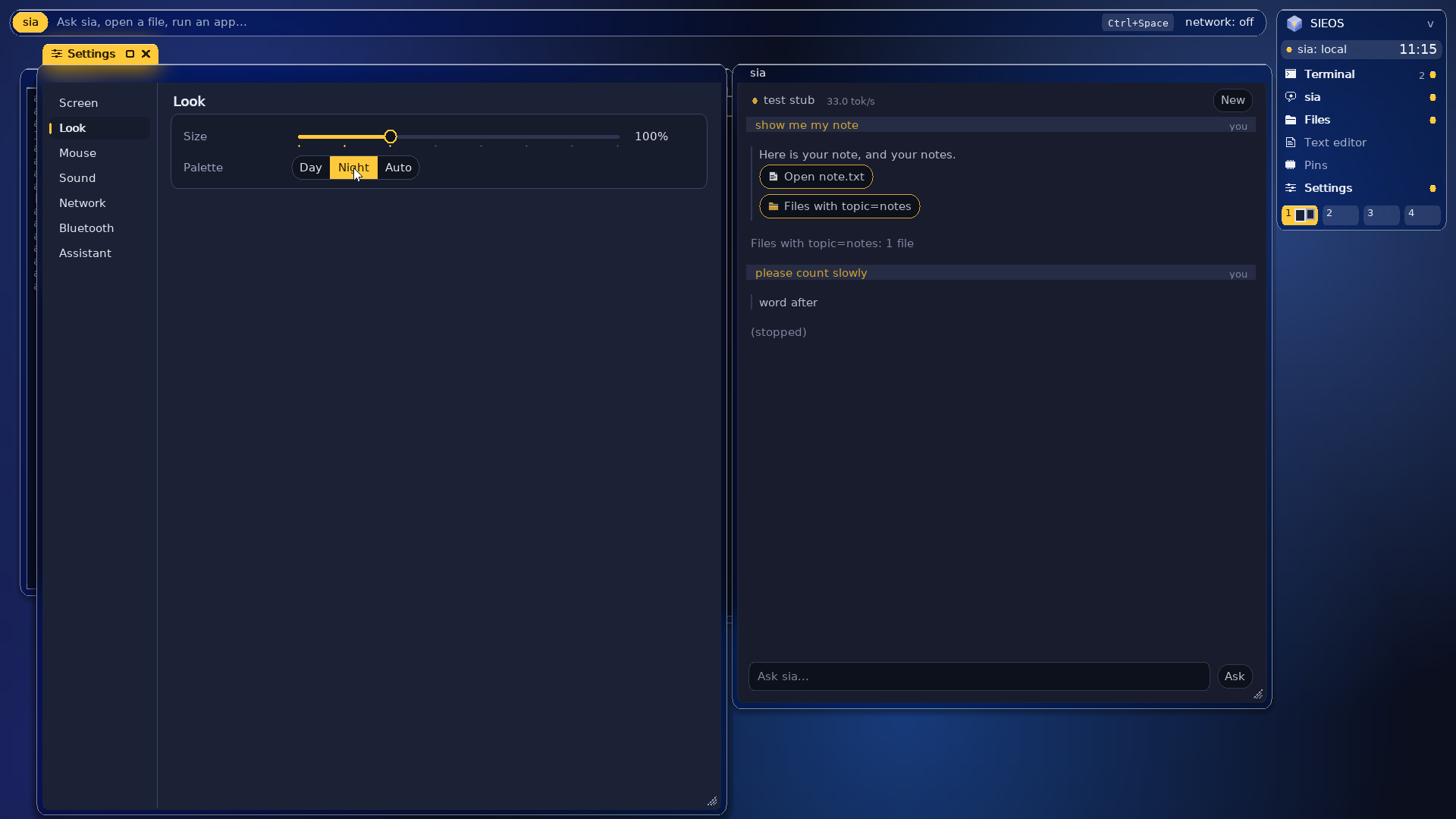
The night palette: Settings on its Look section with Night chosen, beside a conversation with sia, on dark glass
Night. Settings' Look section and a conversation with sia, on smoke-tinted glass.
One look, day or night, any size

The look is frosted glass: a navy desk lit by soft blue glows, and glass for the Deskbar, the sia strip, menus and windows that shows what is behind it, blurred. One amber accent. By day the panes are light; at night the frost is smoke-tinted and the desk darker, by hand or on its own from 19:00 to 7:00. Titles, menus and buttons are in DejaVu Sans, terminals and code in its mono. Settings, a sidebar of sections with a card for each, draws everything from 50% to 400%, sharp at every size, with native fonts at 100%. It also sets the screen size (it goes back by itself after 15 s unless you keep it), the mouse, the sound, the network and sia's model. Super+L locks the screen; the session goes on behind it.

Atlas on Linux

The same desktop runs on Linux too: atlas_wm is a Wayland compositor with the tabs, the Deskbar, the workspaces and the glass, for your Wayland and X11 apps. Read about Atlas on Linux, or get it from GitHub.

The assistant

Meet sia.
A language model on your machine.

Type sia QUESTION, or just sia for a conversation, or press Ctrl+Space then Tab on the desktop. sia runs a language model on the machine with SIEOS's own engine, or uses any OpenAI-compatible service.

  • Local by default. SmolLM2-1.7B (4-bit, 1 GB) loads in 2-3 s and answers at 37 tokens/s on 4 CPUs, 55 on 8. A Pi's card carries SmolLM2-360M (8-bit, 386 MB) instead.
  • Our own engine. It reads GGUF models, with AVX2 and AVX-VNNI kernels on x86-64, NEON and sdot on AArch64.
  • It remembers. Conversations are saved for each user and continue after a reboot. Long ones are compacted into short notes.
  • Only with your OK. sia keeps a few facts about you only when you ask: sia remember "...".
  • Local or online, from Settings. The desktop's Settings switches sia to any OpenAI-compatible service, with root's password.
  • Kept in check. The kernel limits the assistant to 4.5 GiB, and it stops when unused.
sh — alice@sieos
alice@sieos:/home/alice$ sia list
  1   6 turns  ~1.2k tokens  how do I make a project?
  2   2 turns  ~0.4k tokens  what is SieFS?

alice@sieos:/home/alice$ sia resume 2
alice@sieos:/home/alice$ sia memory
  1  my name is Alice
  2  I prefer short answers

alice@sieos:/home/alice$ su root
root@sieos:/home/alice# sia config backend=remote
root@sieos:/home/alice# sia config url=https://api.example.com/v1
root@sieos:/home/alice# sia config api_key=YOUR_KEY
  kept in a root-only file
root@sieos:/home/alice# 

The Raspberry Pi's pins

GPIO, from the shell,
from C, or as a sequencer.

One server, gpiod, gives every program the pins of the Pi's 40-pin header. Use it from the shell with gpio, from C with gpio.h, or from the desktop's Pins window. On a PC it simulates 28 pins, so programs and tests run the same everywhere.

  • Patterns with steady timing. The server plays a pattern on its own thread, with deadlines counted from the start, so the timing does not drift whatever the program does. A step can be as short as 100 µs.
  • Inputs are recorded. At the end of each step the server samples every pin, so a program can read back an input's level at each step of the pattern.
  • Pins in use are protected. A pin a device already uses, such as the serial console's 14 and 15, I2C, SPI or the GFX HAT's pins, shows as busy and is refused.
  • Pi 4, and Pi 2 and 3. SIEOS drives their GPIO blocks directly and sets the pulls the way each chip wants. The Pi 5's pins sit behind its RP1 chip, so they are simulated there for now.
  • Started on demand. init starts the server the first time a program asks for it. Anyone logged in may use it.
sh — alice@sieos
alice@sieos:/home/alice$ gpio out 17 1     # BCM 17, header pin 11: high
alice@sieos:/home/alice$ gpio get 17
1
alice@sieos:/home/alice$ gpio in 27 up      # an input with a pull-up
alice@sieos:/home/alice$ gpio blink 17 250  # every 250 ms, played by the server
alice@sieos:/home/alice$ gpio stop
alice@sieos:/home/alice$ gpio out 14 1
  pin 14 is busy: the serial console uses it

alice@sieos:/home/alice$ cc blink.c -o blink # the C below, built on SIEOS
alice@sieos:/home/alice$ ./blink
alice@sieos:/home/alice$ 
The Pins window, drawn. Each track is a pin. A click on an output's steps sets its pattern; an input's row fills with what it read as the sequence plays.

From C

#include "mk.h"
#include "gpio.h"

int main(void)
{
    gpio_mode(17, GPIO_OUT, GPIO_PULL_NONE); /* an LED */
    gpio_mode(27, GPIO_IN, GPIO_PULL_UP);    /* a button */
    while (gpio_read(27)) {                  /* until pressed */
        gpio_write(17, 1); sleep_ms(200);
        gpio_write(17, 0); sleep_ms(200);
    }
    /* two short blinks, a pause: 100 ms a step, looping */
    uint32_t steps[] = { 1u << 17, 0, 1u << 17, 0, 0, 0 };
    gpio_play(1u << 17, steps, 6, 100000, 1);
    return 0;
}

The tracks are kept in ~/.pins. Up to 8 tracks and 64 steps, from 1 ms to 1 s a step. Every call returns -EBUSY, -EINVAL or -EPERM when it cannot be done. Tested in QEMU with simulated pins; not yet tried on a real board.

What is inside

One system.
Every layer its own.

SieFS, the file system

A copy-on-write B+tree with two superblocks and a checksum in every pointer. A crash leaves the old state or the new one, never a mix. Small files live inside the tree, and attributes are indexed: find key=value.

Tested with 2,151 simulated power cuts.

sicc, the C compiler

One program that preprocesses, compiles, assembles and links C11 for x86-64 and AArch64, with its own optimizer, assemblers and linker. It builds all of SIEOS, compiles itself into byte-identical stages, and keeps NEON vectors in registers.

About 15 times faster than gcc at building SIEOS.

Network and TLS 1.3

TCP/IP, DHCP, DNS, HTTP and TLS 1.3 with certificate checking, written for SIEOS. Drivers for virtio-net, the Pi 4's GENET and the Pi 5's RP1 Ethernet. fetch URL downloads a page.

Crypto checked against official test vectors.

Users and permissions

Argon2id passwords, groups, and permissions enforced by the file server with the identity the kernel stamps on every message. passwd, su, useradd, userdel.

The first start creates root and your account.

The language-model engine

Reads GGUF models and runs them on the CPU, with hand-written AVX2, AVX-VNNI and NEON kernels. It works on SIEOS and, for testing, on the development machine.

37 tokens/s for a 1.7B model on 4 CPUs.

A compiler on SIEOS itself

sicc also runs inside SIEOS as /bin/cc, on x86-64 and on the Pis, with SIEOS's headers and library in /lib/sicc. As a user, in any folder: cc hello.c -o hello, then ./hello.

Its own small C library, on the file server.

Tested end to end

More than 20 automatic test suites boot SIEOS in QEMU on both architectures. They cover the first start, logins, permissions, crash recovery, the network and the assistant, and they drive the desktop through QEMU's monitor: windows, Files, the editor, Settings and Pins.

Plus host tests for SieFS, sicc, the crypto and the engine.

A PC from a USB key

SIEOS's own UEFI loader (11 KB) starts it from a USB key, and SIEOS uses the key as its disk: what you write stays on it. A USB stack with xHCI, hubs, disks, keyboards and mice.

Nothing on the PC's own disks is touched.

A console on a GFX HAT

No serial cable? With a Pimoroni GFX HAT on a Pi 4, its small screen shows the console's log from the very start of the boot, and its touch buttons scroll back through it. The kernel keeps the last 32 KiB of the log.
An amber backlight, like the desktop's accent.

About 57,000 lines of C: kernel 5,500 · servers and programs 20,100 · sicc 19,200 · SieFS 2,300 · engine 2,400.

Where it runs

From QEMU to a
Raspberry Pi.

The same kernel, servers and programs on two architectures. Everything for AArch64 is built by sicc alone.

x86-64
QEMU, KVM
AArch64
QEMU virt
Raspberry Pi 4Raspberry Pi 5
Kernel: SMP, tickless, threads, quotasyesyesyes (QEMU)card image, untested
SieFS diskvirtiovirtioSD cardSD card, untested
Users, login, permissionsyesyesyesuntested
Desktopyesyesyes (USB keyboard, mouse: written, untested)untested
Network, TLSyesyeswritten, untestedwritten, untested
GPIOsimulatedsimulatedreal pins (untested)simulated
Assistant, local modelAVX2 / VNNINEONNEONNEON + sdot
Compiler on SIEOS (cc)yesyesyesuntested
  • 43 / 57 KBkernel, x86-64 / AArch64
  • 0.08-0.11 sboot to the first prompt
  • 3.6-3.9 MiBa desktop session on x86-64
  • 20+automatic test suites

Try it

From make to desktop.

You need gcc, make, python3 and QEMU. KVM is used when /dev/kvm is writable.

sieos-usb.img

A PC with UEFI, or QEMU. Write it to a USB key and start from it, with Secure Boot off.

Download

Write it to a USB key

sudo dd if=sieos-usb.img of=/dev/sdX bs=4M conv=fsync status=progress

Run it in QEMU

qemu-system-x86_64 -smp 4 -m 4G -accel kvm -cpu host -no-reboot \
  -bios /usr/share/ovmf/OVMF.fd \
  -drive if=none,id=k,file=sieos-usb.img,format=raw \
  -device qemu-xhci -device usb-storage,drive=k,bootindex=0 -device usb-tablet \
  -netdev user,id=n0 -device virtio-net-pci,netdev=n0,disable-modern=on,addr=5 \
  -display gtk,zoom-to-fit=on -chardev stdio,id=s0,signal=off -serial chardev:s0

sieos-pi4.img

A Raspberry Pi 4. Write it to an SD card and start the Pi from it.

Download

Write it to an SD card

sudo dd if=sieos-pi4.img of=/dev/sdX bs=4M conv=fsync status=progress

Run it in QEMU

cp --sparse=always build-arm64/sieos-pi4.img build-arm64/pi4-run.img
truncate -s 4G build-arm64/pi4-run.img
qemu-system-aarch64 -M raspi4b -kernel build-arm64/kernel.bin \
  -dtb .hosttools/rpi/bcm2711-rpi-4-b.dtb -initrd build-arm64/modules.img -no-reboot \
  -drive file=build-arm64/pi4-run.img,if=sd,format=raw \
  -display gtk,zoom-to-fit=on -chardev stdio,id=s0,signal=off -serial chardev:s0

Run it from a SIEOS build (make ARCH=arm64): QEMU also needs the kernel, the modules and the Pi's device tree, which the download does not include.

sieos-pi5.img

A Raspberry Pi 5. Not yet tried on a real board.

Download

Write it to an SD card

sudo dd if=sieos-pi5.img of=/dev/sdX bs=4M conv=fsync status=progress

Run it in QEMU

Not possible yet: QEMU does not emulate the Raspberry Pi 5 for now.

Writing an image erases the key or card: replace /dev/sdX with its device, and check it with lsblk first. Or build them yourself:

1

x86-64 in QEMU

git clone https://github.com/omoulin/sieos
cd sieos
make
make run               # a window and this terminal
make run SMP=8 MEM=8G  # 8 CPUs, 8 GiB
make run-nox           # this terminal only

On a new disk, the welcome screen asks for root's password and creates your account.

2

AArch64 and the Pi

make ARCH=arm64 run       # QEMU virt
make ARCH=arm64 run-pi4   # QEMU's Pi 4
make ARCH=arm64 PI=4 sdcard FIRMWARE=dir
make ARCH=arm64 PI=5 sdcard FIRMWARE=dir
# add SDMODEL=1 to put the 360M model on the card

The processor is emulated on a PC, so it is several times slower.

3

A PC from a USB key

make usb       # build/sieos-usb.img
make run-usb   # try it in QEMU first
make usb-test  # the automatic test

Write the image to a USB key (it erases the key) and start a UEFI PC from it, with Secure Boot off.

4

Add the assistant

make model     # copy the model to the disk
make run
sia hello

To leave, log in as root and type poweroff: it writes everything to the disk first.

No warranty

SIEOS is free software, provided “as is”, without warranty of any kind, express or implied, including but not limited to the warranties of merchantability, fitness for a particular purpose and non-infringement. You use it entirely at your own risk. See the GNU General Public License v3, sections 15 and 16, for details.

Roadmap

What is next.

  • The target laptop. UEFI boot from USB, NVMe, USB input, the Realtek network card, then NVIDIA compute for the assistant.
  • The Pis on real boards. USB input, Ethernet, a faster SD card, the Pi 5's GPIO.
  • Python on SIEOS. MicroPython first, with a gpio module, then CPython.
  • A make for SIEOS, now that cc runs there.
  • Encryption and snapshots for SieFS.

Limits today

What it does not do yet.

  • Kernel: one kernel lock; the scheduler does not tell P-cores from E-cores yet.
  • Desktop: few programs have their own window yet (the web browser, Scriptures, made with SIEOS's UI toolkit); the others run as text, in terminals.
  • Files: up to 1 s of changes can be lost if the file server crashes.
  • Network: IPv4 and TLS 1.3 only.
  • Raspberry Pi: USB, Ethernet and the GFX HAT are written but real boards are not yet tried; no Wi-Fi.
All the code is new: the kernel, the servers, the file system, the compiler, the network and the assistant's engine.